

One central repository for every member company
Search: “AR-10245”
Found instantly — even inside scans, thanks to OCR
Invoice metadata pulled automatically from SAP
Permissions by department, every version kept
Why you need a DMS
Documents everywhere — half a day to find one
BeforeScattered storage
- Files on personal laptops, private OneDrives and shared drives
- Many versions, nobody knows which is the latest
- Manual permissions, hard to control who sees what
- Running your own servers, backups and security is expensive
With SP365DMS on SharePoint Online
- Data from laptops and personal OneDrive synced into one platform
- A dedicated folder and site for each member company
- Access control, restore of previous versions and deleted documents
- Built on SharePoint — lower infrastructure, maintenance and security costs
How it works
An invoice enters the repository in 4 steps
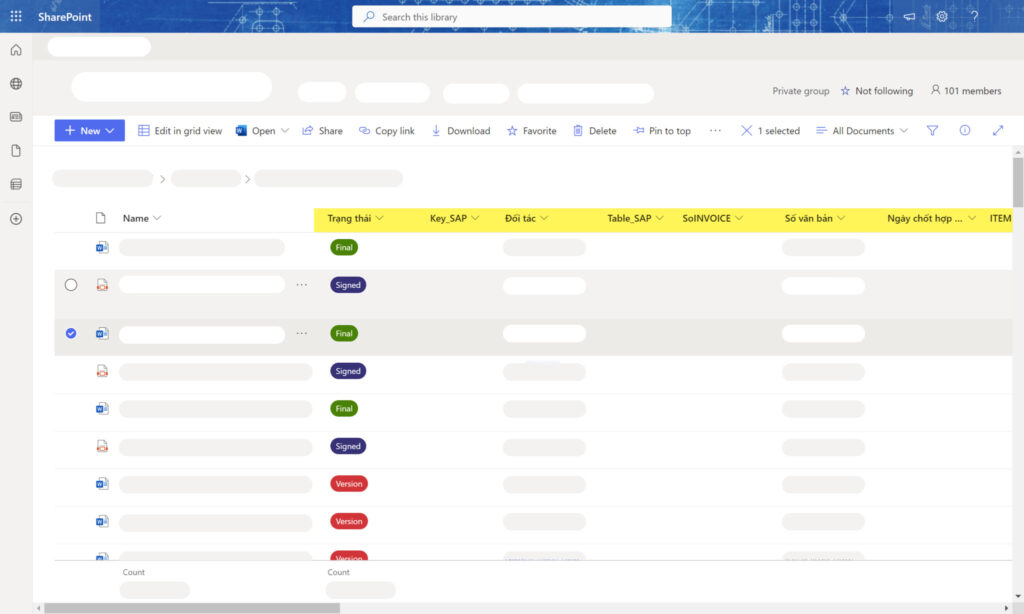
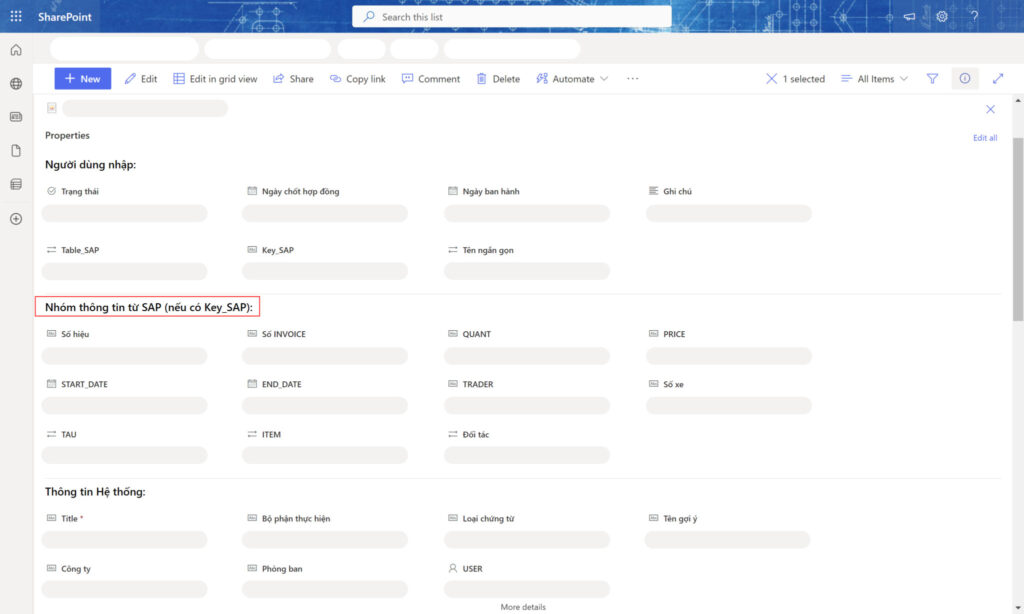
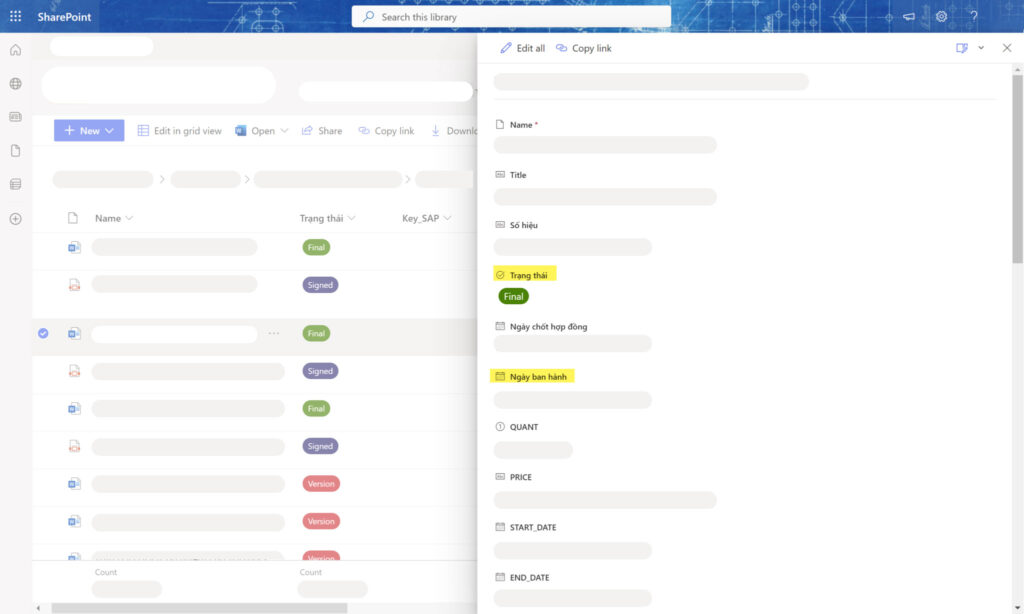
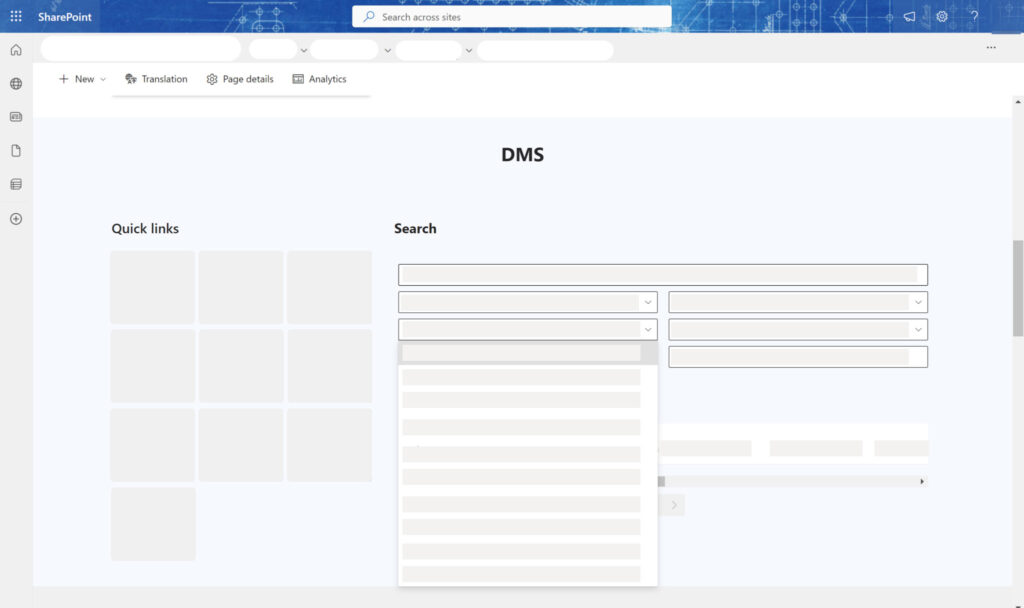
Filing an AR invoice — the document gets its metadata, lands in the right folder with the right permissions, and can be found instantly. The images are real screens.
-
01
Bring documents into the right library
Files from laptops, personal OneDrive or scans go into one central repository, with folders per member company and department.
-
02
Metadata pulled from SAP
Enter the AR invoice number — customer and invoice date are pulled from SAP and attached to the document automatically.
-
03
Permissions and full version history
Only the right department and people can see it; every version is kept, and even deleted documents can be restored.
-
04
Find it in seconds
A search portal over content and metadata across the whole repository — even text inside scans, thanks to OCR.
By department
One repository for every department
Each department and member company has its own space — with central search and governance.
Accounting & finance
Vouchers tagged with SAP metadata, searchable by invoice number or customer.
- AR/AP invoices
- Payment vouchers
- Financial statements
- Tax records
- Receivables/payables reconciliation
- Audit files
Each document type has its own metadata, permissions and versionsGet deployment advice
Legal & contracts
Contracts and legal records with every version kept and strict permissions.
- Customer contracts
- Supplier contracts
- Contract appendices
- Acceptance records
- Licenses and certificates
- Corporate legal records
Each document type has its own metadata, permissions and versionsGet deployment advice
Human resources
Confidential employee records, open only to authorized people.
- Employee records
- Employment contracts
- HR decisions
- Training records
- Competency reviews
- Policies and rules
Each document type has its own metadata, permissions and versionsGet deployment advice
Engineering & ISO
Technical documents and quality procedures, always the latest version.
- ISO procedures
- Work instructions
- Technical drawings
- Equipment records
- Quality forms
- Inspection reports
Each document type has its own metadata, permissions and versionsGet deployment advice
Member companies
One site per company — separate data, central search.
- A site for each company
- Libraries by department
- Permissions by unit
- Controlled sharing
- Central storage
- Group-wide search
Each document type has its own metadata, permissions and versionsGet deployment advice
Data connection
Documents tied to business data
The DMS gathers documents from laptops, personal OneDrive and scans, and pulls metadata from SAP — every document in one repository on SharePoint Online, in the right structure with the right permissions.
Document sources
SAPSAPInvoice and customer metadata
PCPersonal computersWorking folders
ODOneDrivePersonal documents
OCRScans and imagesOCR text recognition
SP365 DMS
Central document repository
on SharePoint Online
on SharePoint Online
LibrariesMetadataSearchPermissionsVersionsOCR
SSharePoint OnlineMicrosoft-grade storage and security
Business outcomes
Find documents in seconds
The right people, the right access
No lost versions, no lost deleted files
Lower infrastructure and maintenance costs
Real results
Read customer stories Companies already running on SP365
Khai Anh GroupOne of Vietnam’s 500 largest companies · Import/export
30%saved on paper and voucher handling100%of import/export processes digitized
ASG CorporationAviation – Logistics – Industrial infrastructure
Group-wideone standardized process systemReal timeprogress and KPI dashboards for the board
FAQ
Before you start, companies often ask
Yes. Data from laptops, personal OneDrive and shared drives is synced into the central repository on SharePoint Online under one folder structure.
Yes. The SAP connection fills in invoice and voucher metadata automatically; without SAP you still define metadata, permissions and search as usual.
No dedicated servers are needed. SP365 runs on the Microsoft 365 your company already uses — SharePoint Online, Teams and Outlook. If you don’t have Microsoft 365 yet, SPS advises on the right licenses.
It depends on scope and customization. After the assessment, SPS proposes a phased roadmap so you can use the most important parts first.
Get started today
Bring all your documents into one place
SPS experts review how you store documents today and propose a DMS structure that fits your company.